This guide explains how to use Pet Battle Scripts together with Rematch
If you want to learn how to write TD Scripts, you can click this link with instructions for it:
Writing Pet Battle Scripts.
1. Required AddOns

Link copied
⇨
Rematch
⇨
Pet Battle Scripts
Also you’ll need a source from which you can get strings and scripts prompt and easy.
Fortunately, this site is just the right one for that task.
Every strategy automatically offers a Rematch String and those that are marked with the respective Tag also provide a Script.
Hint: when a strategy doesn’t include a script on its own, there is a good chance somebody in the comments is sharing one.
2. Importing Rematch Strings
Link copied
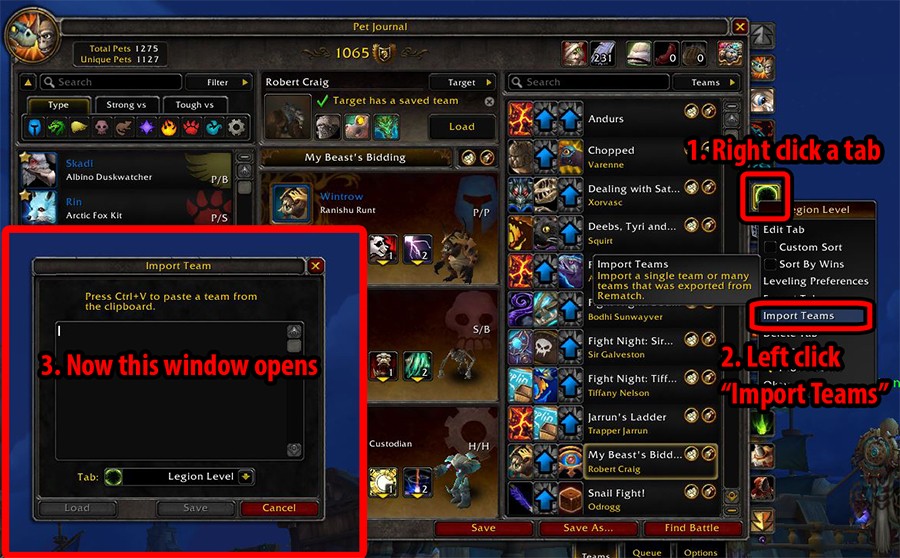
1. Open the Pet Journal ingame. On the right edge, you’ll see one or multiple tabs (which you can edit). Now right click on the tab in that you want to import a certain team.
2. Now left click on “Import Teams”.
3. A window will open in which you can insert a Rematch String.
3. Obtaining a Rematch String from Xu-Fu
Link copied
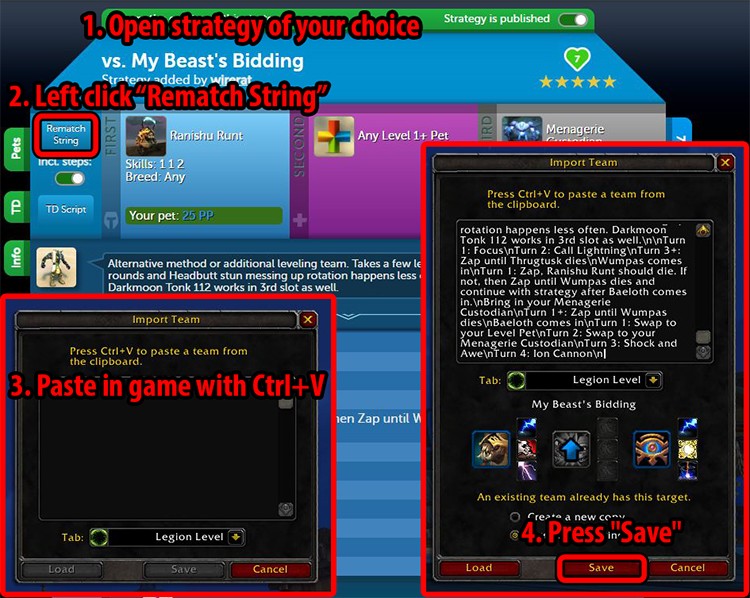
1. Go to the desired strategy on
https://www.wow-petguide.com/.
2. Now left click on the button “Rematch String”.
3. Act as described above and then import the already saved string in the open window.
4. Click “Save”.
4. Importing Pet Battle Scripts
Link copied
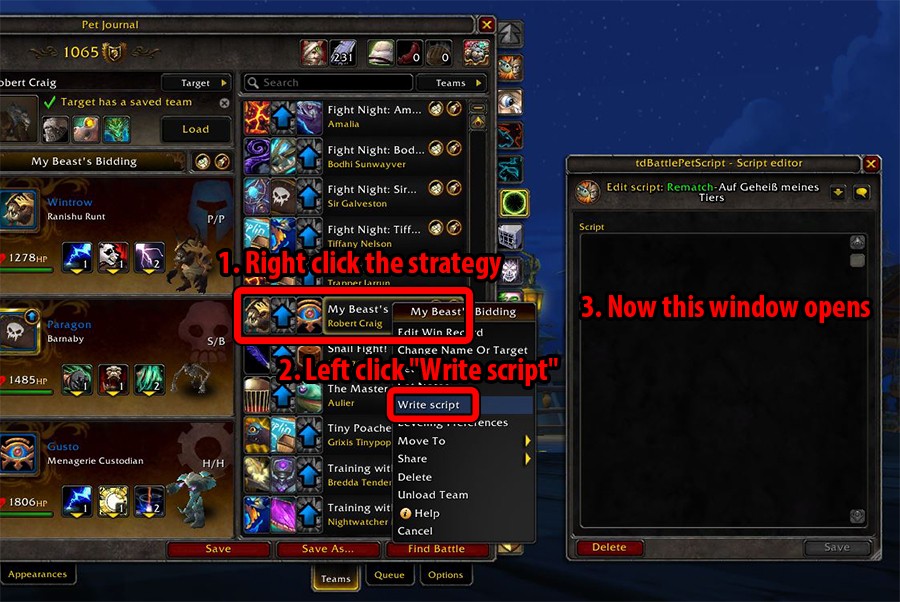
1. Right click on the saved team ingame.
2. Left click on “Write script”.
3. A window opens to either write or insert a script.
5. Obtaining scripts from Xu-Fu
Link copied
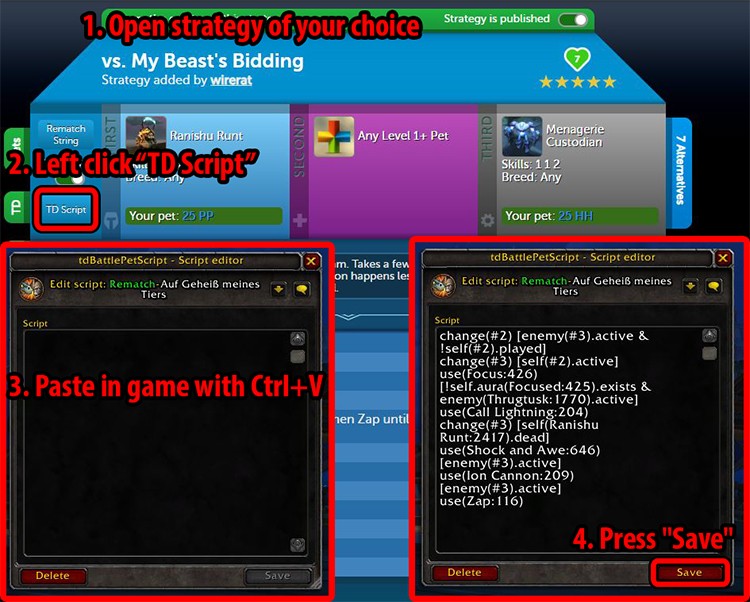
1. Go to the desired strategy on
https://www.wow-petguide.com/.
2. Now left click on the button “Script”.
3. Act as described above and then import the already saved script in the open window.
4. Click “Save”.
That’s it!
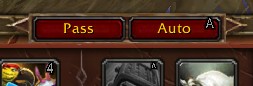
When you face the corresponding encounter, Rematch will now automatically (depending on your settings) load the right team and will also enable you to press just one button (by default A) to play every turn.













2
dropit#11584
wrote on 2026-02-09 19:34:17
1
Fiona#1680
wrote on 2026-02-26 05:53:23
1
Fiona#1680
wrote on 2026-03-12 07:55:06
1
Kilashandra wrote on 2025-07-12 18:06:28
3
kemp707
wrote on 2025-08-04 04:16:31
1
mraymus
wrote on 2025-07-19 03:33:23
Is anybody else seeing this? I do have alot of teams, but I think if the issue was I had too many teams, a /reload wouldn't fix that every time. Anybody have any ideas on this? Is there some sort of reload of rematch I need to do to troubleshoot?
1
YaroTail#2519
wrote on 2025-07-15 09:22:33
1
wow4nw
wrote on 2025-07-09 01:38:37
1
Mutanis
wrote on 2025-07-09 13:52:45
1
wow4nw
wrote on 2025-07-10 01:30:52
2
kkh1
wrote on 2025-04-09 02:28:15
1
Battlevixen#1262
wrote on 2025-04-09 17:10:50
1
kkh1
wrote on 2025-04-16 20:53:14
1
xasiklas#2580
wrote on 2025-01-10 10:41:54
1
DragonsAfterDark
wrote on 2025-01-10 21:45:00
1
xasiklas#2580
wrote on 2025-01-11 22:01:49
1
DragonsAfterDark
wrote on 2025-01-12 07:46:01
7
Quintette
wrote on 2024-08-04 11:10:55
2
Tx92 wrote on 2024-04-27 04:58:45
1
Seb
wrote on 2024-07-30 10:54:49
1
Seb
wrote on 2024-07-30 10:57:47
(edited)
2
themcfreak
wrote on 2024-04-20 18:19:14
1
DragonsAfterDark
wrote on 2024-04-20 19:02:47
2
Fire
wrote on 2022-05-27 00:24:42
4
DragonsAfterDark
wrote on 2022-05-27 15:10:04
Hit Escape > Interface > Addons tab > tdPetBattleScript > General tab. The keybind option is near the bottom.
3
Alayea
wrote on 2022-11-12 19:31:11
2
Tequima
wrote on 2024-03-24 10:31:45
Escape (? on micro toolbar) > Options > click on Addon Tab > Pet Battle Scripts (TD Scripts was abandoned several expacs ago) > change the AutoBattle Hot Key from A to e.g. Space Bar
1
nataliem#2255
wrote on 2024-02-10 23:27:40
1
Poetic
wrote on 2023-12-15 03:04:52
I was hoping the addon would run the entire battle for me, start to finish, and I could watch or read something else while that was happening. It would make power leveling more eenjoyable (especially the Squirt battle).
5
Aranesh
wrote on 2023-12-15 15:18:10
What you can do is bind the action key somewhere else, like your mousewheel, and just spin it. As close to automating as it gets :D
1
Mortdredd#2939
wrote on 2023-12-08 14:10:49
1
Mandarin_Orange
wrote on 2023-12-11 01:46:42
1
Mortdredd#2939
wrote on 2023-12-12 13:15:48
1
Mandarin_Orange
wrote on 2023-12-13 00:59:45
1
Jangeoffry#1582
wrote on 2023-11-21 04:47:28
5
porcia
wrote on 2023-11-09 20:24:16
1
Nusstrudel#2538
wrote on 2023-11-12 11:08:36
1
Fozziestitch#2216
wrote on 2023-10-20 17:51:25
1
FailedDestiny
wrote on 2023-11-01 21:15:16
3
fcoty28#1941
wrote on 2022-12-01 14:51:40
1
fotogrrl69
wrote on 2022-12-01 22:25:24
1
Angeldusk#2381
wrote on 2022-12-04 09:28:40
1
heallie#1103
wrote on 2022-12-07 18:55:18
1
DehSilva#1463
wrote on 2022-12-09 16:00:18
1
fcoty28#1941
wrote on 2022-12-10 16:42:46
1
Dominia
wrote on 2022-12-16 15:55:58
1
fcoty28#1941
wrote on 2022-12-16 22:44:58
1
KIASAYS#1623
wrote on 2022-12-19 18:29:46
0
Alayea
wrote on 2022-12-20 19:01:12
1
Dominia
wrote on 2022-12-23 16:39:50
2
fcoty28#1941
wrote on 2023-01-28 20:02:48
2
rubydruid
wrote on 2023-02-04 01:40:37
1
Dominia
wrote on 2023-02-06 18:20:38
1
Alayea
wrote on 2023-02-06 23:14:23
1
rubydruid
wrote on 2023-02-07 08:45:52
1
Irate#1106
wrote on 2023-04-25 07:08:05
The addons alone do not make the auto button work. You must create a team and then add the script to that team. Then load the team when you do the fight and then it should work. You have to pick a team that you have the pets for as well so you may have to collect and level up many pets to have options for every battle.
There is more info on this site about building teams and adding the scripts for each specific pet battle and it helps a lot if you log into your battle.net account and it sees your pets and it can suggest the best for you.
1
Dominia
wrote on 2023-05-06 00:38:40
1
Celierra#1492
wrote on 2023-06-07 01:17:31
I noticed a few months ago that if you attempt to just install the new addon over the old one, the old code in the "tdBattlePetScript_Rematch" folder will remain and you'll end up with strange conflicts. I don't know if the old Rematch showed up as a separate addon that can be disabled, so I'd say it'd be best to remove it to be sure it doesn't load.
2
Shengis
wrote on 2023-01-04 13:13:18
Seems it was reported, but I've found no help in getting it fixed. Can anyone point me in a direction? TIA
https://github.com/axc450/pbs/issues/20
5
Shade#2932
wrote on 2023-01-12 20:57:59
Link
1
shyendy
wrote on 2023-01-06 00:33:54
1
Rascallycat
wrote on 2023-01-12 09:30:13
1
Velonna
wrote on 2022-12-28 14:47:58
2
Slypknot#1716
wrote on 2022-12-12 22:05:26
1
fcoty28#1941
wrote on 2022-12-09 23:18:45
2
Texman wrote on 2022-10-26 20:00:46
1
brett1337#1825
wrote on 2022-10-27 22:08:50
2
Michelanvalo#1341
wrote on 2022-11-12 12:06:04
https://www.curseforge.com/wow/addons/pet-battle-scripts
3
vinnieparma
wrote on 2022-09-10 04:48:27
Assuming your UI is the stock UI from the Rematch addon, open WoW and when you are in game, press the SHIFT + P buttons to open your Pet Journal. On the right-hand side of your teams should be the icons for each of your teams (there will be the teams that show the three pets within the team and we’re looking just to the right of that – the team tabs on the far right of the pet journal). Right-click the tab and an options menu will come up – it should give options like “Edit Tab, Custom Sort, Sort By Wins, Leveling Preferences, etc.” Left-click the “Export Tab” option, which will bring up the string that you’ll use later on to import everything into Computer B.
Open a Word or notepad document, copy (CTRL + C) the string in game and paste (CTRL + V) to the document (CTRL + V). Save that document to a thumb drive or SD card - I labeled mine “Pet Strings” to make it easy on myself. You’re done with Computer A. On Computer B, insert your thumb drive or SD card, and open the document with your string. Copy (CTRL + C) the entire string. With WoW open and being in game, press the SHIFT + P buttons to open your Pet Journal. On the right-hand side of your teams (which should be empty), there will be a “+” tab. Click it. Choose your icon and name for the tab (at this point it doesn’t matter – we’ll get into naming it later,” then click “Save.” On the tab you just created, right-click the tab and select the “Import Teams” option, then paste (CTRL + V) your string, then click “Save.” Almost done! Lastly, we want to change the name of the tab, so right-click the same tab once again, and click “Edit Tab,” then name it whatever you like, then click “Save.”
You’re done! You can do this method with all teams you may have saved.
Now for the kicker - if you had written any scripts for any of your teams, unfortunately those do not transfer over and will need to either be manually written again or you can simply find the the appropriate script needed here on Xu-Fu's Pet Battle Strategies.
I hope this helps everyone! I love you all.
(if you're interested in helping me out, toss me a follow on instagram - vinnieparma. Thanks guys!) (edited)
0
Unsainted wrote on 2020-10-25 19:11:33
1
Placid
wrote on 2021-01-28 21:42:15
I've transfered both Interface and WTF folders to a new computer. I've got Rematch teams ok, [-- but no corresponding tsBS scripts (Auto is greyed out). :) --]
Strike that: most of the scripts copied ok. Some did not, but I may not have them in the 1st place ;)
Too bad: I have 5 dungeons scripts to re-create ;( (edited)
2
discordiankitty
wrote on 2022-08-12 08:38:35
0
moonblu
wrote on 2022-03-26 18:38:10
1
iSkadi
wrote on 2022-02-03 22:17:14
Thank you for your recommend pet battle addons and this page for the steps. I love how easy this has made pet battling trainers. <3
1
Flyingman#21378
wrote on 2021-11-22 01:14:40
I have the script copied, but then when i hit, Ctrl + V nothing is pasted
1
Gremlin64#1527
wrote on 2021-10-12 13:03:49
1
olnessa
wrote on 2021-09-11 13:01:12
I googled and didn't find much help. I have JavaScript active on my computer. Any help would be greatly appreciated.
2
Vazeelthun
wrote on 2021-05-02 07:51:23
0
Fuhenhenka wrote on 2021-07-11 15:00:34
2
Igniferroque#1917
wrote on 2021-05-22 14:22:22
2
Undyingone#1778
wrote on 2020-11-25 16:21:03
1
Cuth
wrote on 2020-12-03 08:33:16
1
SilkCharm
wrote on 2021-01-24 20:44:52
1
Astara wrote on 2021-02-11 21:19:39
0
Rokeras wrote on 2021-02-11 10:30:34
3
Liriel
wrote on 2021-01-11 11:29:57
2
Yiago
wrote on 2020-12-23 21:27:55
Not sure what to do to fix. Looked all the places I can think of online.
1
Shirooni
wrote on 2020-12-03 15:10:06
2
horick
wrote on 2020-11-04 23:48:35
2
nonster#21263
wrote on 2020-10-19 05:36:05
4
Ectothrix
wrote on 2020-10-16 17:47:43
3
Rhodos#2134
wrote on 2020-10-17 14:12:40
the same thing :(
1
Xayida wrote on 2020-10-15 16:00:45
0
Joebiden wrote on 2020-10-15 17:53:30
4
Gráinne
wrote on 2020-10-15 18:20:56
Temporary Fix for TD Battle Pet Script Addon
1. Download link below
2. Find tdBattlePetScript in your addons folder, delete everything in it
3. Drag everything from the zip into the tdBattlePetScript folder
4. Do a /reload ingame
https://github.com/DengSir/tdBattlePetScript/archive/shadowlands.zip
I will be trying to get this onto Curse ASAP!
I don't know what it's a fix for, exactly, but it might be an improvement on whatever you've got.
1
Novaenea
wrote on 2020-10-15 20:42:19
2
Joebiden wrote on 2020-10-16 05:05:25
1
Nevin#1132
wrote on 2020-10-16 15:30:19
1
Myrahstara#1868
wrote on 2020-10-01 13:09:48
1
Gráinne
wrote on 2020-10-01 14:00:00
You will have a directory
World of Warcraft_retail_WTFAccount999999999#1SavedVariables
(where 99999999 will be some number unique to you)
That is where your addons store their data.
If you just delete your addon, your data will be there when you reinstall your addon.
If you deleted your WTF folder without taking a backup when you were trying to fix your problem, that doesn't help you, but if you moved or renamed it instead, as Blizzard recommend, the files you need should be in that copy.
The files you will want will be Rematch.lua and tdScript.lua
Even if you don't find those, you might find Rematch.lua.bak and tdScript.lua.bak somewhere, and those should be the last ones you had before your last .lua files. (edited)
1
Myrahstara#1868
wrote on 2020-10-01 17:39:49
1
Faelyanna wrote on 2020-09-17 08:25:51
1
Vakovlk
wrote on 2020-09-14 12:34:15
1
Dakender#1566
wrote on 2020-08-29 16:30:18
1
Shenk
wrote on 2020-08-29 16:50:09
1
Dakender#1566
wrote on 2020-08-29 17:56:47
1
Jzenner911
wrote on 2020-08-25 23:23:13
1
Gráinne
wrote on 2020-08-26 01:24:08
0
knight85 wrote on 2020-08-01 08:07:28
1
VladTepis
wrote on 2020-08-06 18:55:10
1
Binkals#1851
wrote on 2020-02-29 04:21:21
1
Shenk
wrote on 2020-02-29 05:47:06
1
nanacam
wrote on 2019-11-18 21:36:46
3
ElderColt#1287
wrote on 2020-02-25 15:11:16
Above is quoted from a response to the same question... I am just responding for folks like me who came to this comment section from a search on Google.
1
Shakesbeer wrote on 2019-07-19 09:05:14
1
Danarshi
wrote on 2020-01-21 03:25:27
Update: I did the same thing again the next day and most of the scripts transferred but not all of them. Strange... (edited)
1
Wuvdara#1558
wrote on 2019-12-14 11:28:06
1
Aranesh
wrote on 2019-12-14 14:41:32
1
Aranesh
wrote on 2019-12-14 14:52:40
0
Ivoire wrote on 2019-11-13 09:05:22
Recently (past 2 days) I've been facing an issue I never encounter before.
While exporting a team with the rematch string button, then importing it in Rematch, the team that appears in Rematch is different from the one selected.
Did reinstall Rematch, both TdPet Battle, removed all WTF data prior to that, reset browser (Opera, Chrome...), and still facing same problem.
Not sure if one of other addon did broke something or a wow patch did a mess ?
Anyone else facing this ?
Ex. Importing Pearlhusk Crawler first strat
Baa'l 1 2 *
Mechanical Pandaren * * 1
Chrominius * 1 2
become
Baa'l 1 2 * Correct
Rebuilt Mechanical Spider * * 1 Error
Chrominius * 1 2 Correct
It seems it bugs when there is substitute pet available in the strat.
Also when using right / left arrow to visualize the substitute, no pet picture changing
String imported is :
Pearlhusk Crawler:4N92:120029G:00102G5:0120140:N:Strategy added by SpruceOPnQuick strat. Chrominius is used as insurance. nnTurn 1: Murder the InnocentnTurn 2: ShadowflamenTurn 3: ShadowflamenTurn 4: ShadowflamenTurn 5: Murder the InnocentnTurn 6: ShadowflamenTurn 7: PassnBring in your Mechanical Pandaren DragonlingnTurn 1: Exploden
No idea how to check what pets ( I suppose) are behind 4N92:120029G:00102G5:0120140:N (edited)
1
Aranesh
wrote on 2019-11-14 09:54:06
2
Ivoire#1844
wrote on 2019-11-16 00:27:46
Mate, great work, great site, amazing attitude toward the community
1
Aranesh
wrote on 2019-11-16 03:51:51
0
Anon wrote on 2019-06-13 07:17:58
1
Aranesh
wrote on 2019-06-14 04:54:30
1
Threewolves
wrote on 2019-08-22 22:25:08
1
Zingi wrote on 2019-07-17 19:30:53
5
Gráinne
wrote on 2019-07-17 20:51:31
World of Warcraft_retail_WTFAccount999999999#1SavedVariables
where "9999999999" will be a different number for you.
If your WoW crashes, it can overwrite your settings files. However, there is usually a file Rematch.lua.bak saved as a backup in that directory, just in case. Renaming that to Rematch.lua will bring your teams back, if it hasn't been overwritten by you saving over it after the crash.
However, you can also export your Teams from Rematch to a plain-text file and mail that to yourself. You can then Import some or all of those again if necessary. Open Rematch, open your Teams tab, and right-click on the Teams button on the top right-hand side. Backup All teams will create a single file of everything for you to copy.
I would not use tdScript myself, so I don't know about that, but I suspect it has a similarly named file in the same directoy. (edited)
2
Threewolves
wrote on 2019-08-22 22:23:39
3
Dabags#1146
wrote on 2019-06-26 02:06:39
https://www.wow-petguide.com/index.php?m=TDScripts
1
Alayea
wrote on 2019-08-16 00:32:37
2
Shenk
wrote on 2019-08-16 02:57:57
0
Adan wrote on 2019-04-27 23:52:16
2
Berendain
wrote on 2019-05-23 01:56:30
2
Seb
wrote on 2019-05-13 19:25:28
6
Ebbiemay
wrote on 2019-04-18 12:54:08
3
Nyari
wrote on 2019-04-18 15:15:46
1
Nolinchen
wrote on 2024-11-12 08:05:54
1
bibopip
wrote on 2022-04-23 06:26:12
1
ragath
wrote on 2019-05-23 12:34:28
0
Servaggia wrote on 2023-11-17 12:30:41
1
Blackmu
wrote on 2019-07-17 11:50:19
1
matronaclo
wrote on 2020-08-22 21:11:11
2
3aplus63maf wrote on 2020-04-21 00:31:07
New Comment: